
SEO tools
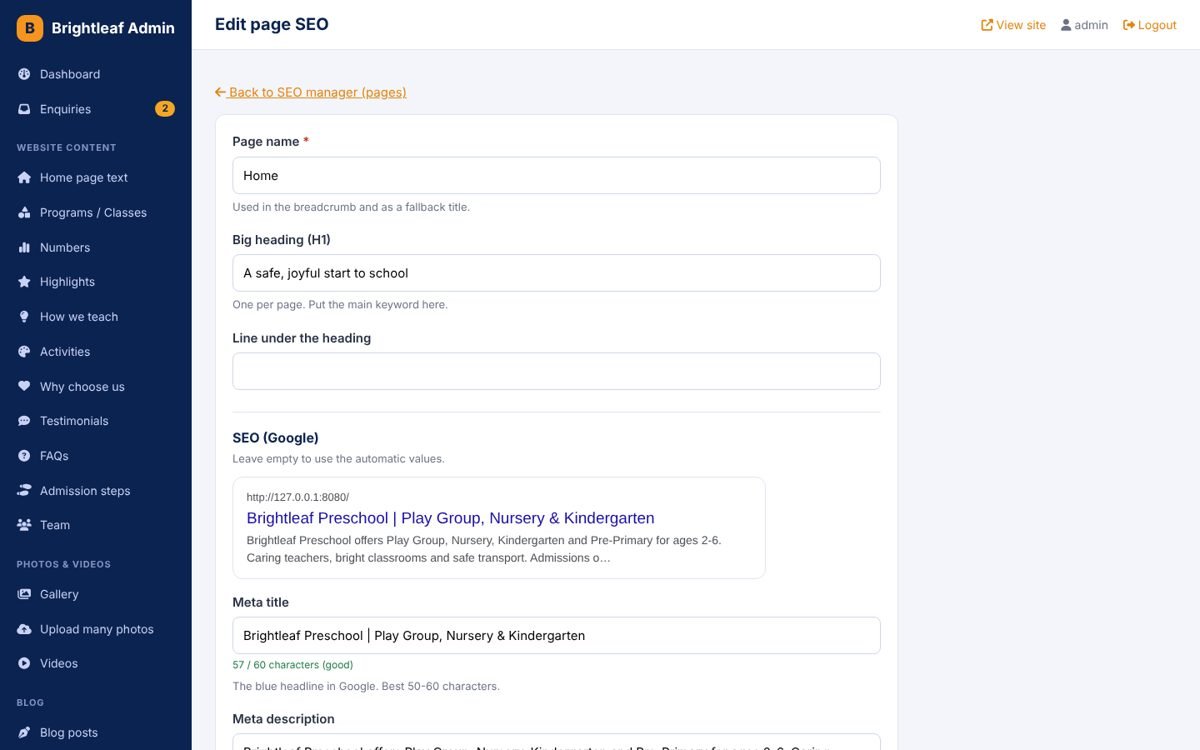
Per page
The SEO manager has every main page (Home, About, Programs, Gallery, Videos, Careers, Contact, Enquiry, Blog). Class pages, blog posts and labels have the same SEO box on their own edit screen:
| Field | What it does |
|---|---|
| Big heading (H1) | The main heading of the page. Put your main keyword here. |
| Meta title | The blue headline in Google (best 50–60 characters, counter included). |
| Meta description | The grey text under the headline (best 140–160 characters). |
| Meta keywords | Comma separated keywords. Duplicates and empty items are removed automatically. |
| Canonical URL | Only if the page is a copy of another page. Leave empty for automatic. |
| Schema code (JSON-LD) | Paste extra structured data from any schema generator, with or without <script> tags. Invalid code is refused with a message, so it can never break the page. |
| noindex | Hide the page from Google. |
| Social share image | The picture shown when the page is shared on WhatsApp or Facebook (1200 × 630 px). |
A live Google preview shows how the page will look in search results while you type.
Site-wide (Admin → SEO settings & codes)
- Default title ending, description and keywords for pages without their own.
- Google Search Console and Bing verification codes.
- Automatic school schema (name, address, hours, phone, classes, social profiles) on every page.
- Extra site-wide schema code.
- Code boxes for Google Analytics, Tag Manager, Meta Pixel or chat widgets.
Automatic
/sitemap.xml, /robots.txt, canonical links, breadcrumbs with schema, FAQ schema on the home page, article schema on posts, Open Graph and Twitter tags. Submit yoursite.com/sitemap.xml in Google Search Console after going live.